A pet for every Claude Code sessionBloblings tucks a little drawer onto the edge of your Mac. Every Claude Code session gets its own Blobling that types, hammers, reads and naps along with it. Send out subagents and a little crew appears beside it. And it jumps up and waves the moment it needs you.
100% free. No account, no trial, no catch.
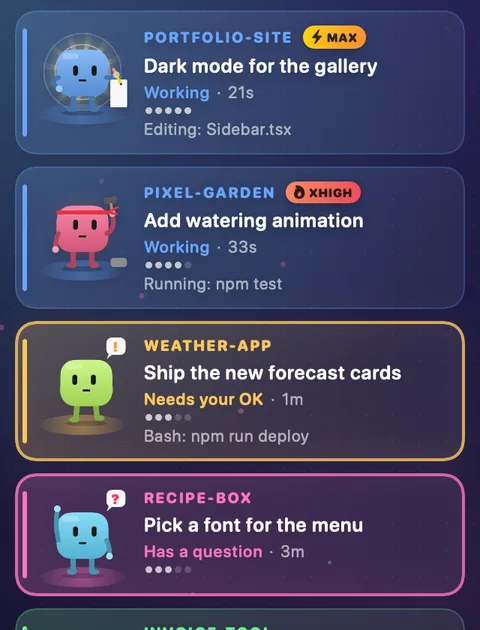
A live demo: Bloblings that need you jump to the top, and the Polish the website session is running three subagents. Click "Subtasks" to fold them away. Every pet here is drawn by the app itself.
Jump to the right thread
With dozens of threads across different projects, it's easy to lose your place, or type into the wrong one. Bloblings shows you exactly who needs you. Click a Blobling and the Claude app (or Codex) jumps straight to its thread, in the right project, every time.
Four sessions need you, buried somewhere in hundreds of threads.
An illustration. The apps on the left stand in for the Claude desktop app and the Codex app, where you answer each thread. Bloblings never approves anything for you.
How it works
Bloblings is made for Claude Code, Anthropic's coding agent: sessions in the Code tab of the Claude desktop app, with terminal sessions showing up too. Run it the way you already do. It sits quietly at the side and tells you, at a glance, who's busy, who's done and who's waiting on you.
Bloblings adds one small hook to Claude Code. Each time a session uses a tool, it writes a short note on your Mac: which tool, plus a short hint like a file name, or Claude's own description of a command (never the command itself). It takes about 10 milliseconds and never holds Claude up.
Every session gets its own colourful Blobling with a name, and keeps it. Editing? It types. Running tests? It hammers. Reading files? Nose in a book.
When a session needs your OK, has a question, wants a plan approved or has changes to commit, its Blobling lights up. Finished turns get a calm "New reply" Blobling. The ones that need you rise to the top, and a click jumps into the thread.
Subagents, in plain sight
When a Claude Code session hands work to subagents, its Blobling starts throwing paper planes (or calling through a megaphone) and a little crew of heads appears beneath it. Open "Subtasks" and every helper gets its own pet, its task and what it's doing right now.
Read the room
Over thirty little performances, each one telling you what a session is up to without you having to open it.
Needs your OKWants permission to run something
Needs your inputWaiting for you to type a reply
Has a questionHand up, waiting for an answer
Plan to approveHolding up the plan for you
Commit readyFinished, with changes to commit: holds out a parcel and glows until you commit. Sharing a folder? Only the thread that changed the files
EditingTapping away at your files
Running commandsHammer out, sparks flying
ReadingNose in your codebase
BrowsingOff searching the web
DelegatingSending helpers off on errands
ConductingRunning a multi-agent workflow: bow tie, baton and a row of helpers
ThinkingLightbulb moments
ShippingParachutes in on push, deploy or publish. New sessions drop in too
Clean-up jobsLint, format or delete: out comes the vacuum (still Working)
Tidying upSweeping up while it compacts
In the backgroundGoes fishing or watches an hourglass while a long job runs
SupervisingSent its helpers off? It puts its feet up with a coffee and cheers them on
New replyFinished its turn. Holds up a sealed envelope or reads a letter. Calm, no glow
Hit a snagSomething failed, it's on it
DoneFinished and seen: off to the beach with a deck chair, umbrella and a cold drink. The longer it stays, the more sun it gets
Maybe stuckNodded off after ten quiet minutes (or 5, or 20: your choice)Please don't

A Blobling that's blocked on you, or holding a commit, waits patiently. For a while. Then a clock appears on the wall, it starts to waste away, and things get dusty. (Finished replies never do this. They just wait calmly.)

"Hello! Quick one for you."

A clock on the wall, a big hourglass, a tapping foot. Getting skinnier.

Cobwebs, and a little spider moving in.

Down to the bones. A tumbleweed rolls past.


A pile of dust and some flies. Still blinking, still waving. Still waiting.
Finished pets you've already seen head to the beach, and time passes there too: the sun crosses the sky and sets into the sea like a sundial. It stays gentle, with no clocks and no cobwebs, so you can always tell them from pets that are waiting on you.

Feet up, sunglasses on, drink in hand. Bliss.

Going pink. An hourglass sinks into the sand.

Sunburnt and peeling. Glass empty. A crab wanders past.

Bones in the deckchair. Sunglasses still on.


A pile of dust under the umbrella. Flies.
Effort modes
Sessions on extra high or max effort, or running Ultracode, get a look and moves of their own, and their cards wear an XHIGH, MAX or ULTRA badge. Every card also shows which model it's on, and how hard it's thinking.
A red headband, a warm glow, and karate.
Flying kickAcross the card. "HI-YAH!"
Karate chopSplits a board on two bricks
PunchesLeft, right, little starsThe floating guru. Light radiates from it; now and then it rises into a serene, cross-legged hover.
EnlightenmentA soft white-gold glow, slowly turning rays and rings of light pulsing outwardTurn Ultracode on and the Blobling rides a jet stream: a blue-violet glow, streaks of light racing past, sparks, wind-swept cheeks, and the whole body buffeted about, whatever it's doing. An ULTRA badge sits by the project name. When it hands work out to a whole crew, it still puts on the bow tie and conducts.
Typing at speedWind in its cheeks, steady hands
Hammering in a galeBuffeted, but still on the buttonUnder each Blobling's status: which model the session is on, and five dots for effort. Hover for the full model name, or turn the badges off in Settings.


Subagents get the same looks: a helper at extra high wears the headband, and one at max or ultra glows like the guru. Even the tiny crew heads under a Blobling show a red band or a golden halo.
A thread on Fable 5.1 ultra can send out Fable 5.1 high helpers, or an Opus 5.5 thread can send Sonnet 5 helpers. Each one shows its own model and effort.
Small things that help


Press it from anywhere. The drawer opens on whoever has waited longest and rings them with a bouncing "Next up". Press again within a few seconds to jump into that thread, or wait a moment and press again to move to the next in line. Blocked sessions come first, then commits, then new replies.

One screen before you log off: who's still waiting, which repos have uncommitted changes, which follow-ups are scheduled and what's still running.

Click any Blobling to open its thread in the Claude desktop app. Lost a thread? Recent lists the ones from the last day, each Blobling asleep in a hammock; one click and it's back in the drawer. Right-click to start a new session in the same folder.


Every Blobling dances for eight seconds and confetti falls. It does nothing useful. You'll press it anyway.

The drawer hides behind a slim tab on the screen edge. A menu-bar count shows who's waiting, an optional chirp tells you, and it opens at login. Watching something full screen? It steps out of the way, unless you ask it to keep an eye on things.


The Blobling with the latest news rises to the top, so with 20 sessions open the urgent one is always in view. Rather they kept their places, with only the ones that need you jumping up? Or nothing moving at all? It's a setting.


Some prompts never get reported, like one from your own guard hook, or from a subagent running in bypass mode. Bloblings catches them anyway: if a command, edit or read has had no result for ten seconds and isn't actually running, the Blobling switches to "Needs your OK", glows, and ⌥⌘P finds it. Main threads and subtasks alike. You still answer it in the thread.
New: the desk
Clients, projects and rates; notes with timecodes as you go; and a split of each session by the Claude threads that were working. Invoice summary in one click. All on your Mac.
00:10:00Matched the colour across reel 200:45:00Client wants the sunset warmer, re-graded shots 12 to 1801:12:08Exported the review copyAcme Films · 1 to 9 Oct Reel 2 grade 6h 45m at $120 = $810.00 Trailer cut 2h 00m at $110 = $220.00 Total 8h 45m $1,030.00
The desk in the drawer. Threads can overlap, so the shares can add up to more than 100%.
Not just Claude
Copy one prompt from Settings, paste it into Codex or whichever agent you use, and it connects itself, asking your OK before it changes anything.
Codex, Hermes, Gemini, Grok or any other agent that runs on this Mac can connect itself. Copy this prompt and paste it into the agent:
Already have Bloblings? This button really copies a setup prompt. The one in the app also tells the agent exactly where the command lives on your Mac.
Ten looks
Each theme changes the background, textures, particles, fonts and even how the Bloblings are coloured. Pick one and see the real app.

Between jobs
When a Blobling has nothing to do, it doesn't just stand there. Yo-yos, skipping ropes, cartwheels, ukulele, meditation, hula hoops, skateboards, juggling, bubble gum, peekaboo from a box, peeking round the edge then strolling back in to say hi, popcorn, the occasional hiccup. Leave it long enough and it heads off to the hot tub or the beach.
Light and private
Bloblings is written in Swift and SwiftUI. No Electron, no bundled browser.
Light on your Mac: animation pauses when the drawer is hidden. The hook always finishes cleanly and never blocks a session, even if the app isn't running.
Install
100% free. No account, no trial, no ads, no catch.
Sponsor a Blobling ☕Totally optional. If Bloblings makes your day, help fill the tin on Ko-fi.
Version 1.0.10 · 2.6 MB · macOS 15 Sequoia or later · Requires Claude Code (in the Claude desktop app or your terminal)
Want to check the file is exactly the one we published? In Terminal, run:
shasum -a 256 ~/Downloads/Bloblings-1.0.10.dmg
It should print this fingerprint (SHA-256):
SHA-256: 3a2fa64246a7869c5a2dd9758c6b479e14f82a4158b059ef7ef0225492ed0e2f
Apple's notarisation already checks the app when you open it; this is an extra check for the careful.
Questions
No. The hook takes about 10 milliseconds, prints nothing and always exits cleanly, so Claude never waits on it. If Bloblings isn't running, the hook just leaves a note for later.
It reads Claude's own files on your Mac to work out what each session is doing: the hook's notes (the tool, a file name or Claude's short description of a command, and the folder; commands themselves are never stored), session titles from the Claude app, and the session logs to spot helpers, background jobs and scheduled follow-ups. It also checks your repos for uncommitted changes with read-only git. Nothing leaves your Mac: Bloblings makes no network requests at all.
No. Bloblings is for Claude Code, Anthropic's coding agent: sessions in the Code tab of the Claude desktop app, or claude in your terminal. Ordinary chats in Claude (the Chat tab, claude.ai or the phone app) don't report what they're doing, so they don't get a Blobling. Other coding agents that run on your Mac can connect too.
Terminal sessions get a Blobling too, named after their session or folder. Session titles and click-to-jump only work for sessions in the Claude desktop app.
Not yet. Clicking a Blobling takes you straight to the thread, so it's one click away. We're looking at a safe, opt-in way to do more from the drawer.
Open Settings → Claude Code → "Uninstall Bloblings…". It removes its hook (your other hooks stay exactly as they were), its login item, its data and its settings, then shows the app in Finder so you can drag it to the Bin. It leaves up to three backups of your Claude Code settings in ~/.claude, just in case. If you just want a break, "Disconnect" is right there too.
No. Bloblings is an independent project made by a fan of Claude Code. It isn't affiliated with or endorsed by Anthropic.
Nothing at all. Bloblings is 100% free: no trial, no account, no ads, and nothing is held back. If it makes your day, you can sponsor a Blobling on Ko-fi ☕, but that's entirely optional and doesn't unlock anything.